
Switching banks without losing your direct deposit takes about two to three weeks if you keep both accounts open during the transition. The most common mistake is closing the old account before the new direct deposit is confirmed. Set up the new direct deposit first, wait for at least one full pay cycle to land in the new account, then move automatic payments and close the old account last. The process has no fees if you time it right.
Roughly 30% of Americans have never switched their primary bank, according to a Bankrate survey. The top reason cited is not that people love their bank. It is that switching feels complicated, especially when direct deposit and automatic payments are involved. The process is simpler than most people think, but the order matters. Do things out of sequence and you risk a bounced payment or a paycheck deposited into a closed account. Here is the step-by-step, based on how we verify financial processes.
How Long Does It Take to Switch Banks?
The full transition takes two to four weeks if you do it safely. The timeline depends on your employer’s payroll processing speed. Most payroll systems update direct deposit information within one to two pay cycles. Some update within a single cycle.
The critical period is the overlap: the window when both your old and new accounts are open and active. Closing the old account too early is the single most common switching mistake. Keep both accounts open for at least 30 days after the new direct deposit is confirmed.
Here is a realistic timeline for someone paid biweekly:
| Week | Action | Status |
|---|---|---|
| Week 1 | Open new bank account and fund it with a small transfer | Both accounts active |
| Week 1 | Submit direct deposit change to employer (HR or payroll portal) | Change pending |
| Week 2-3 | First paycheck lands in new account (confirm full amount) | New deposit confirmed |
| Week 3-4 | Move automatic payments to new account (one at a time) | Migrating billers |
| Week 5-6 | Monitor old account for any stray deposits or charges | Watching for stragglers |
| Week 6+ | Close old account after confirming zero pending transactions | Transition complete |
What Information Do You Need to Switch Direct Deposit?
Your employer’s payroll department or HR portal needs three pieces of information from your new bank: the bank routing number (nine digits, identifies the bank), the account number (identifies your specific account), and the account type (checking or savings). These are found in the new bank’s app under account details or on a voided check.
Some employers also require a voided check or a direct deposit authorization form. Digital banks that do not issue paper checks typically provide a “direct deposit form” PDF or a letter with the routing and account numbers. Chime, SoFi, and most digital banks generate this document in their mobile app under settings.
If your employer uses a major payroll provider like ADP, Gusto, or Paychex, you can often update the direct deposit yourself through the employee portal without going through HR at all.
Should You Close the Old Account Immediately?
No. This is the single biggest mistake people make when switching banks. Closing the old account before all automatic payments have moved creates bounced payments, late fees, and potential damage to your credit score if a loan payment bounces.
The safe approach is a staged shutdown. After the first paycheck lands in the new account, keep the old account open with a small buffer (at least $200) for at least 30 more days. During this time, monitor it for any charges or deposits you forgot to redirect.
Common payments that people forget to move include annual subscriptions, quarterly insurance premiums, and infrequent automatic payments like property tax escrow. A review of three months of old bank statements catches most of these.
How Do You Move Automatic Payments to a New Bank?
Move automatic payments one at a time over a two-week period. Do not move everything at once. Each biller has its own processing timeline, and updating ten billers simultaneously creates ten chances for something to go wrong.
Start with the payments that matter most: mortgage or rent, car payment, insurance, and utilities. These are the ones where a missed payment causes the most damage. Move subscriptions and smaller recurring charges last.
For each biller, log into the biller’s website or app and update the payment method. Some billers let you update instantly. Others need one billing cycle to process the change. Keep the old account funded until you confirm each biller has successfully charged the new account.
Streaming services, gym memberships, and app subscriptions are low-risk to move because a failed payment usually just pauses service rather than triggering fees or credit reporting. These can be batched at the end.
What If Your Employer Takes a Long Time to Process the Change?
Some employers, especially smaller businesses with manual payroll, can take two to three pay cycles to update direct deposit. Government agencies are sometimes slower. If you are a federal employee, the change typically processes within one to two pay cycles through the Employee Personal Page system.
While waiting, keep enough money in the old account to cover any automatic payments still drawing from it. Do not assume the change has processed until you physically see the deposit in your new account. Check the deposit amount too: some employers send a small test deposit (often $0.01 to $0.99) before routing the full paycheck.
If the change is taking unusually long, contact your payroll department directly. The most common issue is a transposed digit in the routing or account number. One wrong number sends the deposit into limbo, where it bounces back to the payroll provider and gets re-routed, adding another pay cycle to the delay.
Can You Split Direct Deposit Between Two Banks?
Many employers allow split direct deposits, where a fixed dollar amount or percentage goes to one account and the remainder goes to another. This is the safest way to transition because you can route a small portion to the new bank first, confirm it works, then shift the full amount.
A split deposit is also useful long-term. Some people permanently route a percentage of each paycheck directly into a high-yield savings account at a different bank. This automates saving without requiring manual transfers.
Check your employer’s payroll portal for options like “add another account” or “split deposit.” If it is not available in the self-service portal, ask HR. Most modern payroll systems support at least two deposit accounts.
What Is the Checklist for Switching Banks?
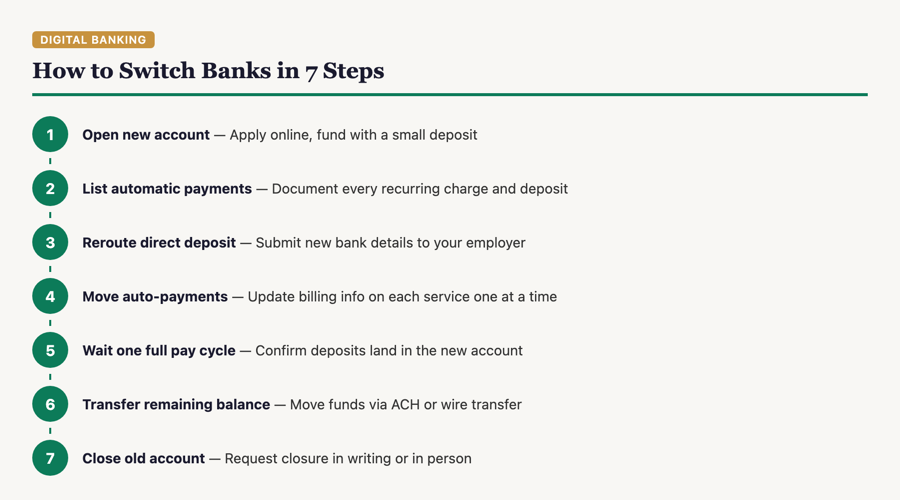
This is the complete checklist in order. Do not skip steps or rearrange them.
- Open the new account and fund it with a small initial deposit
- Order a debit card if one is not issued automatically
- Set up online banking and the mobile app
- Submit the direct deposit change to your employer
- Wait for the first full paycheck to land in the new account
- Update automatic bill payments one at a time, starting with the highest-priority bills
- Update any accounts that deposit money to you (side gig platforms, government benefits, tax refund routing)
- Review three months of old bank statements for recurring charges you may have missed
- Monitor the old account for 30 days after the last change
- Transfer any remaining balance from the old account to the new one
- Close the old account in person, by phone, or through the bank’s app
- Request written confirmation that the old account is closed with a zero balance
If you are switching to a digital bank specifically, see our comparison of Chime vs. SoFi to pick the right destination, or browse the full teen banking guide if you are opening an account for a minor at the same time.
Frequently Asked Questions
Will I lose money if I switch banks?
No, as long as you keep the old account open until all automatic payments and deposits have moved. The only cost risk is overdraft fees if you close the old account while a payment is still pending against it.
Can I switch banks if I have a loan with my current bank?
Yes. Moving your checking account does not affect existing loans. However, some banks offer rate discounts for auto-pay from their own checking account. Check whether moving your payment account changes your loan terms before switching.
How do I switch direct deposit for government benefits like Social Security?
Social Security direct deposit can be changed online at ssa.gov, by calling 1-800-772-1213, or by contacting your new bank. Many banks offer to handle the switch for you through the Treasury Department’s Go Direct program.
Does switching banks affect my credit score?
Opening a new bank account does not affect your credit score. Banks run a soft inquiry (not a hard pull) for checking accounts. Closing an old account also has no credit impact. The only risk is if a bounced automatic payment during the transition hits your credit report.
Can I switch banks entirely online?
Yes. Most digital banks and many traditional banks allow you to open a new account entirely online. Closing the old account can sometimes be done through the app or by phone, though some banks require a branch visit or a written request.
Sources
- FDIC — Deposit Insurance Coverage, fdic.gov
- Consumer Financial Protection Bureau — Managing Bank Accounts, consumerfinance.gov
- ADP — Employee Direct Deposit Management, adp.com
- Social Security Administration — Direct Deposit Changes, ssa.gov
MyMomToken.com is not a bank or financial advisor. This guide is for educational purposes. See our research methodology and disclaimer for details.