
After Mint shut down in early 2024, millions of people lost their default budgeting tool. The good news: several free alternatives are genuinely better. EveryDollar offers zero-based budgeting with no time limit on its free tier. Goodbudget uses the envelope method digitally. PocketGuard shows you what is actually safe to spend. The right pick depends on whether you want manual control or automated tracking.
What Happened to Mint, and What Should You Use Instead?
Intuit shut down Mint in early 2024 and directed users to Credit Karma. Credit Karma offers credit monitoring but is not a budgeting tool. This left a gap in the market for people who want free, straightforward budget tracking without paying for a premium service.
Mint’s shutdown forced a reckoning. The app had been coasting on its brand name for years while neglecting core features and loading up on ads. The alternatives that filled the gap are, in many cases, better designed and more focused.
The free budgeting apps worth using fall into two categories: manual-entry apps where you log every transaction yourself (which builds better spending awareness) and bank-linked apps that pull transactions automatically (which saves time but reduces engagement). Both approaches work. The best one is whichever you will actually use consistently. For more context on managing money tools, see our guides on best digital banks and best payment apps.
Which Free Budgeting Apps Are Actually Free?
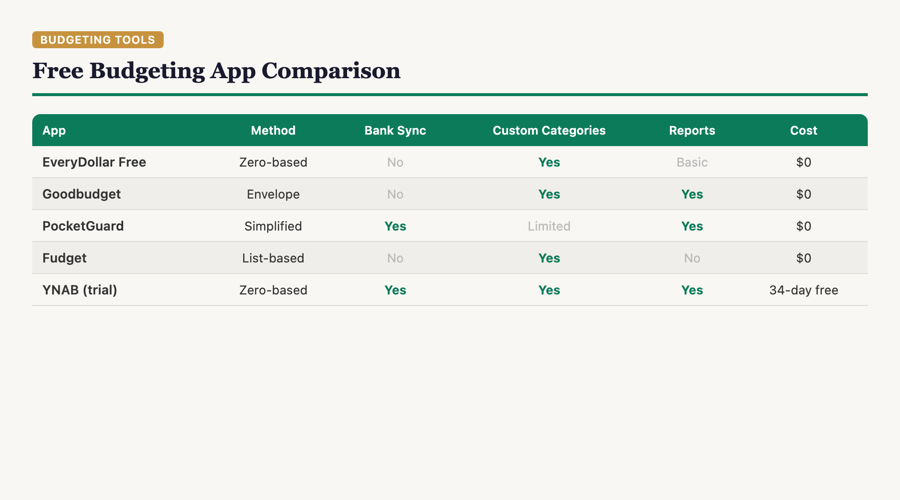
“Free” in budgeting apps usually means a limited free tier with a paid upgrade. EveryDollar, Goodbudget, and PocketGuard all offer genuinely usable free versions. YNAB does not have a free tier at all. The table below shows what you actually get without paying.
| App | Free Tier | Method | Bank Link (Free) | Paid Upgrade |
|---|---|---|---|---|
| EveryDollar | Unlimited (no time limit) | Zero-based budgeting | No (manual entry only) | $79.99/year or $17.99/month |
| Goodbudget | Limited envelopes + 1 account | Envelope budgeting | No | $10/month or $80/year |
| PocketGuard | Basic tracking + “In My Pocket” feature | Automated tracking | Yes | $12.99/month or $74.99/year |
| Copilot | No free tier (paid only) | Automated tracking + AI | Yes | $14.99/month or $119.99/year |
| YNAB | 34-day trial only | Zero-based budgeting | Yes | $14.99/month or $109/year |
What Is the Best Free App for Manual Budget Tracking?
EveryDollar is the best free app for manual budget tracking. Its free tier has no time limit, includes unlimited custom categories, sinking funds, and live support. The only feature locked behind the paywall is automatic bank transaction imports. For people willing to log transactions manually, the free version is complete.
Ramsey Solutions reports that EveryDollar uses zero-based budgeting, which means every dollar of income is assigned a specific job before the month starts. Income minus expenses should equal zero. This method is effective because it forces you to make spending decisions in advance rather than reacting to what has already happened.
The manual entry requirement is a feature, not a bug. Research on financial behavior consistently shows that people who manually track spending are more aware of where their money goes. The friction of logging a purchase creates a moment of reflection that automatic syncing skips.
What Is the Best Free App If You Want Bank Syncing?
PocketGuard is the strongest free option with bank syncing. It connects to your financial accounts, categorizes transactions automatically, and calculates an “In My Pocket” number that shows how much you can safely spend after accounting for bills, savings goals, and necessities.
The “In My Pocket” feature is PocketGuard’s real differentiator. Instead of making you set up categories and limits, it does the math for you and shows one number: what is left to spend without going over budget or missing a bill. For people who find traditional budgeting overwhelming, this simplicity is the appeal.
The free version has limitations. Advanced features like custom categories, bill negotiation, and detailed reports are behind the paywall. But for basic “am I overspending” visibility, the free tier handles it.
Is the Envelope Method Still Relevant Digitally?
Yes. The envelope method — dividing cash into physical envelopes for each spending category — translates well to digital apps. Goodbudget is the leading digital envelope app, and the constraint of “when the envelope is empty, you stop spending” is just as powerful on a screen as it is with paper envelopes.
Goodbudget’s free tier limits you to a smaller number of envelopes and one account. For people with simple budgets (rent, groceries, transportation, fun money), the free tier covers the essentials. The paid version adds unlimited envelopes, multiple accounts, and debt tracking.
My honest take: the envelope method works best for people who struggle with overspending in specific categories. If your problem is eating out too much, having a visible “restaurants” envelope that drains down throughout the month is a powerful behavioral nudge. If your problem is not knowing where money goes generally, a tracking app like PocketGuard is the better fit.
Should You Pay for a Budgeting App or Stick with Free?
Start free. Paid budgeting apps are worth it only after you have established a consistent budgeting habit and hit a specific limitation of the free tier. YNAB at $14.99/month or $109/year is the gold standard for paid budgeting, but paying for it before you have proven you will budget consistently is wasting money on good intentions.
According to YNAB, the average new user saves $600 in their first two months. If that is accurate, the subscription pays for itself quickly. But “average” includes both power users and people who sign up, use it twice, and forget. Only pay for a budgeting app after you have used a free one for at least two months and hit a genuine wall.
For more on budgeting strategies, see our guide on budgeting with irregular income and read our research methodology.
Frequently Asked Questions
Is Credit Karma a good replacement for Mint?
No. Credit Karma is a credit monitoring tool, not a budgeting app. It tracks your credit score and offers financial product recommendations. It does not help you set spending limits, track expenses by category, or create a monthly budget.
Do free budgeting apps sell your financial data?
Some do. Read the privacy policy before connecting bank accounts. Apps that are completely free with no paid tier are more likely to monetize your data. Apps with a freemium model (free tier plus paid upgrade) typically use the paid tier as their primary revenue source.
Can a spreadsheet work as well as a budgeting app?
Yes. Google Sheets or Excel with a simple income-and-expense template works for people who prefer total control. The tradeoff is convenience: a spreadsheet requires more manual effort and has no mobile notifications or real-time tracking.
How do I choose between zero-based and envelope budgeting?
Zero-based budgeting assigns every dollar a purpose before the month begins. Envelope budgeting limits spending per category. They overlap significantly. Zero-based is better for income planning. Envelopes are better for spending control on specific categories.
Do budgeting apps work with all banks?
Most apps that offer bank syncing use Plaid or similar aggregators, which connect to thousands of banks and credit unions. Smaller community banks and some credit unions may not be supported. Check the app’s bank connection list before committing.
Sources
- Ramsey Solutions — EveryDollar Features and Pricing (checked when I last reviewed)
- YNAB — YNAB Pricing
- PocketGuard — PocketGuard App
- Goodbudget — Goodbudget Envelope Budgeting
MyMomToken.com is not affiliated with any of the apps listed above. This content is for educational purposes only and does not constitute financial advice.